Interpreting power flow results
Power flow results appear as annotations on your diagram components. This guide explains how to read and interpret each result type.
Understanding severity colors
All annotations use color coding to indicate operating conditions:
| Color | Meaning | Voltage Range | Loading Range |
|---|---|---|---|
| Green | Normal operation | ±3% of nominal | ≤90% |
| Yellow | Warning condition | ±3% to ±5% | >90% to 100% (protection devices to 105.3%) |
| Red | Critical condition | >±5% | >100% (protection devices >105.3%) |
| Gray | Stale results | - | - |
Green indicates healthy operation within design margins. Yellow suggests the component is approaching its limits. Red means the component violates design criteria and needs attention.
Gray annotations indicate the results are outdated because you modified the diagram after running the analysis.
Reading voltage annotations
Voltage annotations appear on buses and show the calculated bus voltage.
Per-unit display:
- Shows voltage as a fraction of nominal voltage
- Example:
0.98 pumeans 98% of rated voltage - Easier to spot voltage issues across different voltage levels
Engineering units display:
- Shows actual voltage in kV or V
- Example:
470 Von a 480 V bus - Matches equipment nameplate values
Voltage angle:
- Shown in degrees relative to the reference source
- Example:
-2.3°indicates the bus lags the reference by 2.3 degrees - Important for power flow direction and stability analysis
Voltage deviation thresholds
The system applies standard voltage deviation limits:
±3% threshold (green to yellow):
- Acceptable for most distribution equipment
- Within ANSI C84.1 Range A limits
- No immediate action needed
±5% threshold (yellow to red):
- Approaching equipment voltage limits
- May cause motor heating or lighting flicker
- Investigate voltage drop issues
- Consider transformer tap changes or voltage regulators
Examples:
On a 480 V system:
0.97 pu(465.6 V) = Yellow (>3% low)0.92 pu(441.6 V) = Red (>5% low)1.04 pu(499.2 V) = Yellow (>3% high)1.06 pu(508.8 V) = Red (>5% high)
Reading cable current and loading
Cable and line annotations show the current flowing through the conductor and the loading percentage.
Current display:
- Shows magnitude in kA or A
- Example:
1.2 kAmeans 1,200 amperes - Does not show direction (use power flow arrows if enabled)
Loading percentage:
- Calculated as: (actual current / rated ampacity) × 100%
- Example:
85%means conductor carries 85% of its rated capacity - Based on cable ampacity at 75°C per NEC termination limits (not the 90°C manufacturer rating)
Loading severity thresholds
≤90% (green):
- Normal operating range
- Adequate margin for load growth
- Conductor operates well below thermal limits
>90% to 100% (yellow):
- Approaching rated capacity
- Limited margin for additional load
- Review for future expansion needs
- Verify derating factors applied correctly
>100% (red):
- Exceeds rated ampacity
- Conductor may overheat
- Violates NEC 215.4(A) and 310.15
- Requires larger conductor or load reduction
Cable annotation example
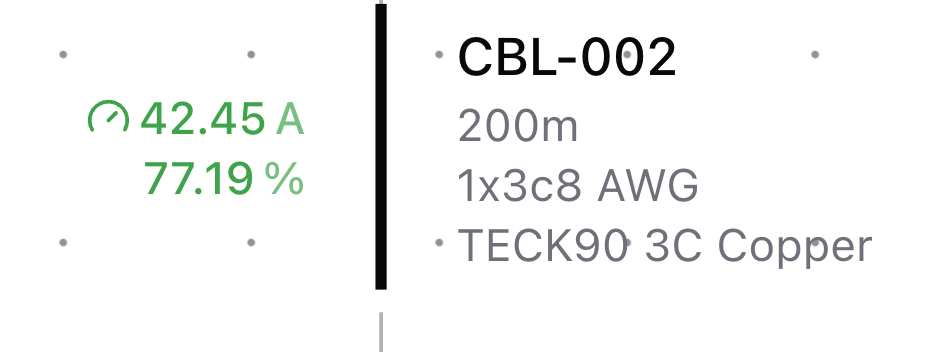
The cable annotation displays:
Current (42.45 A):
- Shown in green with a meter icon
- Indicates 42.45 amperes flowing through the cable
- Green color means current is within normal operating range
Loading percentage (77.19%):
- Calculated as (42.45 A / rated ampacity) × 100%
- Green indicates healthy loading (≤90%)
- Adequate margin exists for load variations
Cable identification (CBL-002):
- Component name for reference in reports
- 200m length shown for documentation
- 1x3c8 AWG configuration (1 run of 3-conductor 8 AWG)
- TECK90 3C Copper series specification
This example shows normal cable operation with appropriate sizing. The 77.19% loading provides margin for:
- Future load growth
- Temporary peak demands
- Derating factor safety margins
If this cable showed 95% loading (yellow), you would review whether additional load growth is planned. At 105% loading (red), you would need to increase the conductor size or reduce the load.
Reading transformer results
Transformer annotations show loading percentage and currents on both sides.
Loading percentage:
- Calculated as: (actual kVA / rated kVA) × 100%
- Based on apparent power through transformer
- Example:
78%means transformer operates at 78% of nameplate rating
HV current (primary side):
- Current on high voltage winding
- Example:
45 Aon 13.8 kV side
LV current (secondary side):
- Current on low voltage winding
- Example:
1,150 Aon 480 V side - Higher current due to lower voltage (same power)
Transformer loading thresholds
≤90% (green):
- Normal operating range
- Transformer runs cool
- Room for load growth
>90% to 100% (yellow):
- Approaching nameplate rating
- Monitor temperature rise
- Limited headroom for peak loads
>100% (red):
- Exceeds nameplate kVA
- May overheat and reduce transformer life
- Check for sustained overload vs brief peak
- Consider larger transformer or load shedding
Reading generator results
Generator annotations show loading percentage and power output after power flow analysis.
Loading percentage:
- Calculated as: (actual output / rated MVA) × 100%
- Example:
65%means generator operates at 65% of nameplate capacity - Color-coded: green (≤90%), yellow (>90% to 100%), red (>100%)
Active and reactive power output:
- Real power output in MW
- Reactive power output in MVAR
- Shows how much the generator contributes to the system
Power factor:
- Example:
PF 0.891 lagging - Lagging when the generator supplies reactive power, leading when it absorbs it
- Utility feed annotations show their power factor the same way
Loading thresholds:
- Green (≤90%): Normal operating range with headroom for load changes
- Yellow (>90% to 100%): Approaching rated capacity, limited reserve margin
- Red (>100%): Exceeds nameplate rating, risk of overheating or trip
> Note: In systems without a utility feed, the generator acts as the slack bus and balances all system power. Its loading depends entirely on the connected loads.
Reading cable voltage drop
Cable annotations include voltage drop data from power flow analysis:
Voltage drop percentage:
- Shows the voltage lost across the cable length
- Calculated from the difference between sending and receiving end voltages
- Example:
2.1%voltage drop
Voltage drop significance:
- Feeders: aim for less than 2% drop
- Branch circuits: aim for less than 3% drop
- Combined (feeder + branch): aim for less than 5% total drop
These are NEC recommendations, not mandatory requirements. If power flow shows excessive voltage drop, upsize the conductor even if ampacity is adequate.
Reading protection device results
Protection device annotations show loading after power flow. Two loading figures are available.
Rated loading is the actual current divided by the device's full rating.
Derated loading applies the continuous-load rule that sizing uses (NEC 210.20(A), CEC Rule 8-104(6)). Most low-voltage breakers are 80% rated, and ekx assumes 80% unless you enter the breaker's Continuous Duty rating. An 80%-rated breaker may carry non-continuous load up to its full rating, but its continuous load is limited to 80% of the rating. ekx therefore counts current from loads marked Continuous Load at 125% and all other current at 100%, then divides by the rating. Motor current counts as non-continuous, because motor circuits follow their own sizing rules.
A 100 A, 80%-rated breaker reads:
| Load through the breaker | Rated loading | Derated loading |
|---|---|---|
| 90 A non-continuous | 90% | 90% |
| 90 A continuous | 90% | 112.5% |
| 40 A continuous + 40 A non-continuous | 80% | 90% |
Low-voltage breakers show derated loading by default. A derated loading over 100% means the breaker is carrying more than the code allows for its mix of loads. If a breaker reads higher than you expect, check whether the loads it feeds are correctly marked continuous, and whether the breaker is listed for 100% continuous operation.
Derated loading can exceed 100% on a breaker that sizing selected correctly. Sizing uses the load's nameplate current at nominal voltage. Power flow holds a constant-power load's power fixed, so when the bus voltage sags the load draws more current. A 50 A non-continuous load on a 50 A breaker at 96.6% bus voltage draws about 51.8 A and reads 103.6%. Protection devices therefore stay yellow up to 105.3%, the loading a device sized exactly to its load reaches at 95% bus voltage, where the bus voltage itself turns red. Above 105.3% the device shows red.
Reading load annotations
Load annotations show the power consumed by the load and the terminal voltage.
Current:
- Actual current drawn by load in A or kA
- Example:
125 A
Active power:
- Real power consumption in MW or kW
- Example:
50 kW - Should match your load specification if voltage is nominal
Reactive power:
- Reactive power consumption in MVAR or kVAR
- Example:
30 kVAR - Depends on load power factor
Terminal voltage:
- Actual voltage at load connection point
- May differ from bus voltage due to cable voltage drop
- Example:
470 Von a 480 V nominal load - Red if voltage is too low for equipment
Capacitor banks:
- A capacitor bank shows active power, reactive power, and current like a load
- The reactive power line adds the output as a percent of the energized steps' rated kvar, for example
-285.1 kVAR 95.0% rated - Above 110% of the bank's rated voltage, the terminal voltage turns amber and reads Above 110% rated V, and the load flow report lists the bank under Overvoltage Conditions
Load terminal voltage significance
Terminal voltage shows the actual voltage delivered to equipment:
- Motors may fail to start if terminal voltage <90% nominal
- Lighting output reduces with low voltage
- Electronic equipment may malfunction below 85% nominal
- Excessive voltage causes equipment overheating
Example:
A motor specified for 480 V showing terminal voltage of 440 V:
- Voltage is 91.7% of nominal (yellow or red depending on threshold)
- Motor may overheat or fail to develop rated torque
- Indicates excessive voltage drop in supply cable
- Action: Increase cable size or check connections
Identifying violations
Scan your diagram for red annotations after power flow completes. Red annotations indicate:
Voltage violations:
- Undervoltage: Increase cable size, adjust transformer taps, or add voltage regulators
- Overvoltage: Check generator voltage settings, utility operating voltage and transformer tap position
- Capacitor bank above 110% of rated voltage: switch out steps, or use a bank rated for the system voltage
Current violations:
- Cable overload: Increase conductor size or reduce load
- Verify cable installation type and derating factors
Transformer violations:
- Overload: Install larger transformer or reduce connected load
- Check if overload is continuous or peak demand
Stale results indicator
When annotations appear gray with "stale" indicator:
- Results are from a previous calculation
- Diagram has changed since last power flow run
- Values may no longer be accurate
- Click Load Flow to update results
Never rely on stale results for design decisions or compliance verification.
Related topics
- Understanding power flow - What power flow calculates
- Running power flow - How to run analysis
- Troubleshooting convergence - Fixing analysis issues
- Cable sizing - Sizing conductors based on power flow results